Keep a prayer journal
Write down what God is doing, before or after you pray, with a prompt that turns you to Him, and come back to it later.
Steps
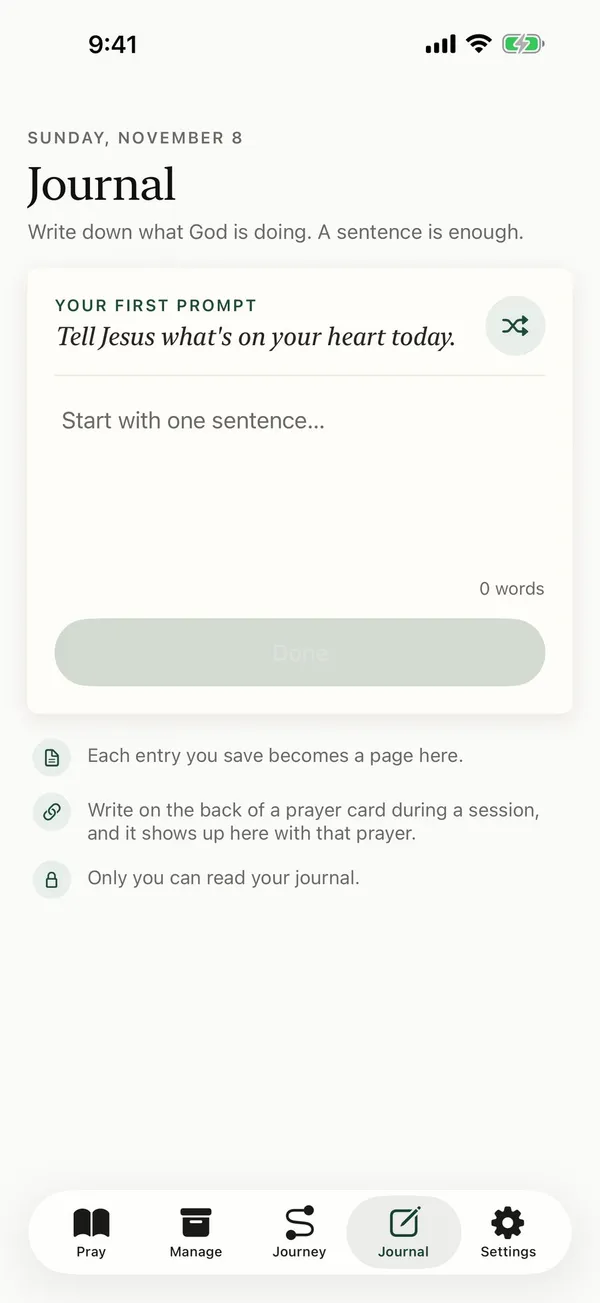
- Tap Journal at the bottom of the screen.
- Read today's prompt at the top. Tap the shuffle button for a different one.
- Write in the box. A sentence is enough. It saves as you type, and you'll see Saving… and then Saved.
- Tap Done when you finish. Your entry becomes a page in your journal, and Write another starts a new one.
- Your earlier entries are listed below, newest first. Tap one to read it or keep writing.
Common questions
Can I write in my journal while I pray?
Yes. During a prayer session, tap the prayer card to flip it, and write under Write in journal. It saves as you type, and the entry shows in your journal under the name of the prayer it came from.
What should I write?
Write to God in your own words: what you’re thankful for, what you’re carrying, what you’re asking for, and what you’ve seen Him do. If you’re not sure where to start, begin with today’s prompt, like “Thank God for something he gave you today.” For more ideas, see these prayer journal prompts.
How do I delete an entry?
Touch and hold the entry in your list, then tap Delete. Deleting an entry can’t be undone.
Can I keep a copy of my journal?
Yes. Download My Data in Settings includes your journal entries. See download your prayers and journal.
When should I write?
Any time works. Writing before you pray can slow you down and help you focus. Writing after helps you remember what you prayed and what you sensed. You can also flip a card while you pray and write about that one prayer. Each prompt turns you to God, so what you write reads like a prayer. Tap the shuffle button if today’s prompt doesn’t fit.
Posts about this
- How to pray for someone who hurt youHow to pray for someone who hurt you, what Jesus said about praying for those who wrong us, honest prayers to start with, and how forgiveness grows over time.
- How to start a prayer journal, a simple guide for beginnersHow to start a prayer journal, what to write, prompts for when you're stuck, and how to record God's answers so you can look back on them later.
- Prayer for anxiety and worry, with Bible versesShort Christian prayers for anxiety and worry, for night, before a hard day and for a friend, with Bible verses on anxiety and where to get help.