Download your prayers and journal
Save a copy of your prayer cards, journal entries, and account data as a file.
Steps
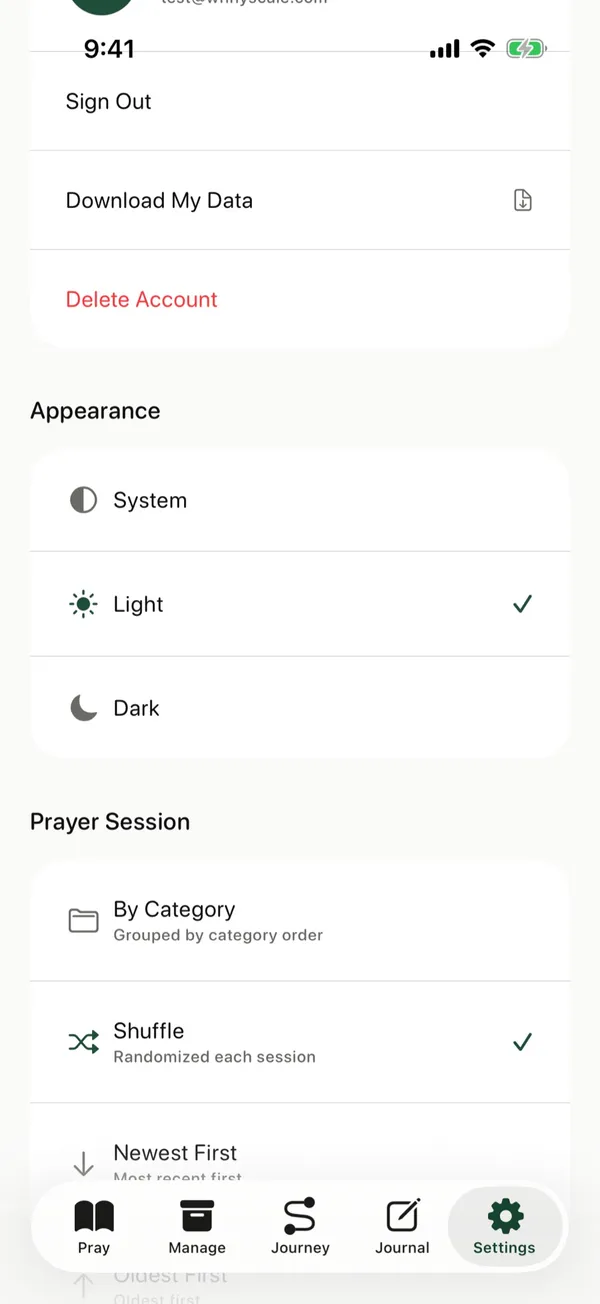
- Tap Settings at the bottom of the screen.
- Under Account, tap Download My Data.
- Choose where to save the file, such as Files, or send it with AirDrop.
Good to know
The file is in JSON format. Its name starts with prayercards-export and ends with the date.
What’s in the file
The file includes your prayer cards and categories, your journal entries, your prayer sessions and history, the days you’ve prayed, and the email address on your account. It’s a copy, so nothing in the app changes when you download it.
Common questions
How do I open the file?
JSON is plain text, so any text editor on a computer can open it. It’s laid out for computers to read, so expect labels, brackets, and quotation marks around your words.
Do I need an internet connection?
Yes. The app builds the file from what’s saved in your account, so it needs a connection. If you’ve prayed or written in your journal offline, open the app while you’re online first so your latest changes sync.
How often can I download my data?
Up to three times an hour. If you reach the limit, wait an hour and try again.
Why keep a copy?
A copy lets you keep your prayers and journal outside the app, read them years from now, or save them before you delete your account.
Does the file include my Bible reading plan?
No. The file holds your prayers, your journal, and your prayer history, but not your Bible reading plan.
Is the file private?
The file is saved wherever you choose, and anyone who has it can read it. Keep it somewhere safe, and send it only to people you trust.
Posts about this
- Offline prayer app, pray anywhere without a connectionWhy an offline prayer app helps you pray on planes, trains, and quiet mornings, what works offline in The Pray App, and how your prayers stay private.
- Free prayer app with no ads for iPhoneThe Pray App is a free prayer app for iPhone with no ads. Prayer cards, a journal, answered prayers, and a Bible reading plan, with your data kept private.
- Prayer journal app, how to keep a prayer journal on iPhoneWhat to look for in a prayer journal app, how journaling on your iPhone compares to paper, and how The Pray App ties your journal to the people you pray for.